
How Can Brands Compete in ChatGPT Without Paying for Ads?
AI has become part of how people research and look for products, as well as…


SEO is more important than ever, and there are multiple ways to boost your search engine rankings so that you gain more online visibility. However, one of the most overlooked SEO steps is being ignored by even digital marketing experts. Robot text (or robot txt) is either a mystery to those experts, or they overlook just how important it is when it comes to getting yourself recognized by search engines. If you want to improve your performance on search engine results pages, then you need to learn just how to implement robots txt. Here is our brief guide to the robots txt format and how to use robots txt for SEO.
The robots.txt fileA robots.txt file is a simple text document that you can use to control the behavior of search engine crawlers in your site directory. is a very small part of your website (every website has the file in its code), but many people are unaware that it exists or what it does. Designed to work with search engines, robots txt format allows you to boost your SEO performance dramatically. Even without any kind of technical skill, it’s a simple matter of looking at your website’s source code and finding the robot text.
Put simply; a robots txt file lets search engines know the pages that you want them to see and crawl (and what pages they can ignore).
Every time a new webpage is published, bots’ crawl’ through the page to determine what it’s about and how much value it has in regards to answering a search query. The bots that crawl websites will always check the robot txt file first. Robot text is your way of letting your web pages communicate directly with search engines, and that can only be good news for your SEO.
Google uses GooglebotGooglebot is a web crawler. It follows links and indexes pages for search engines to make it easier for users to find what they're looking for. to crawl through websites, while other search engines use a variety of different bots (sometimes called spiders). As different types of bots crawl your site (your website code calls them User Agents), it’s important to know which search engines can access or not access your pages. A standard robots txt example would look like this:
User-agent: *
Disallow: /
You could also have:
User-agent: Googlebot
Disallow: /nogooglebot/
The asterisk in the first example means that you are going to address access to all bots from all search engines. It might seem counterintuitive to disallow a webpage, but there are many reasons to do so that can affect your SEO. If you have print-only pages that are a duplicate of another page, then you don’t want search engines to consider that page as a duplicate contentDuplicate content is content that appears more than once across a single website. Duplicate content can be a sign of poor resource management, low trust, or a lack of quality control.. Doing so will reduce your value and negatively affect your SERP ranking.
Bots like Googlebot will have what is called a ‘crawl budget’, and the faster that these bots can crawl through your webpages the better for them and for you.
By making sure that bots can only crawl the most important pages on your website, you can dramatically speed up processing time and ensure that your other SEO changes have the maximum effect.
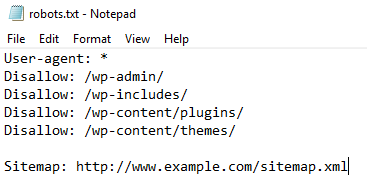 How do I create a robots txt file?
To start this process, remember that you should only use a plain text editor. Check your website’s robots txt file, and if it’s there then delete the text (but not the file itself). Next, determine if you are going to use an asterisk (which will affect every search engine bot) or you’ll name specific crawler bots like Googlebot. It’s best to use an asterisk if you’re not sure. Then, you need to choose if you want your site to be crawlable. If you do, then make sure that the code reads ‘allow’. If you don’t want your site to be crawlable, then change the code text to ‘disallow’. It is that simple. However, this will affect every page of your website at once.
Your next step is to detect the pages that you don’t want to be crawled by search engine bots. There are many reasons why you might want this. Admin pages do not need to be crawled, and neither do log-in pages. You want to disallow:
That will mean going to your robots txt file and making it look like this:
User-agent: *
Disallow: /admin/
Disallow: /log-in/
Do this for every page on your site, making sure that your highest quality pages have the word Allow in the code.
Ensuring that search engine bots can crawl through the right pages and ignore what they don’t need to waste time on means that your site will get a much more dramatic SEO boost than you might have thought. Don’t overlook the importance of robot txt, or your performance on SERPs will be extremely limited.

AI has become part of how people research and look for products, as well as…

If you’ve ever tested your website using Google PageSpeed Insights, you’ve probably been met with…

Seasonality can have a huge effect on the success of your business. It is imperative to have a strong digital marketing campaign during periods of high consumer demand.



Towards the end of September, on the 24th, Google released the second spam update in…

The amount you invest in your link building budget should be based on the realistic…

Search engines aren't the only automated systems accessing, interpreting, and making sense of content found…

There's plenty of scope when creating SEO campaigns. Each industry that turns to experts for…

PR has long supported brands in building authority and spreading awareness, but PR distribution has…

SEO can be complicated. It’s constantly changing and is not a one-and-done job. That’s something…

Google announced it was rolling out a further spam update on August 18, 2026. It…

Growing an SEO agency takes a lot of hard work. You've got to keep up…
Fill out the contact form or give us a call for a free consultation to determine the right digital marketing solutions for the growth of your business.

The team will usually respond within 1 hour.