
Google’s AI Overview: Everything You Need to Know in 2025
AI search is a hot topic, and it’s also confusing. There’s a lot of tools…


If you are after information about Google Analytics or questioning “what is Google Analytics used for?” then you are in the right place!
Google is the most prominent search engine that people use for everyday searches. So it’s natural to want to get to the top of the rankings and improve conversions and engagement for your company. A helpful way to fully utilize and understand how well your website performs is using Google’s own tools, particularly Google Analytics.
So why use Google Analytics, and what does Google Analytics do?
On a basic level, Google Analytics information gives you a range of tools to understand your target audience better. With this data, you can monitor your marketing efforts and make adjustments to improve your positioning within rankings. The user-interface is relatively easy to understand, and it is designed to work with other Google tools such as its publisher products and advertising platform Google Ads.
In short, every website should have a form of detailed analytics to help monitor and improve its performance. This data also answers questions about your audience and how they use your site.
The best use of Google Analytics is to answer questions such as:
These are just a few of the questions that are asked when using Google Analytics, and some are answered below. Sound good so far?
To help you get the most using Google Analytics for your company, here are some ways to use the data to improve your website:
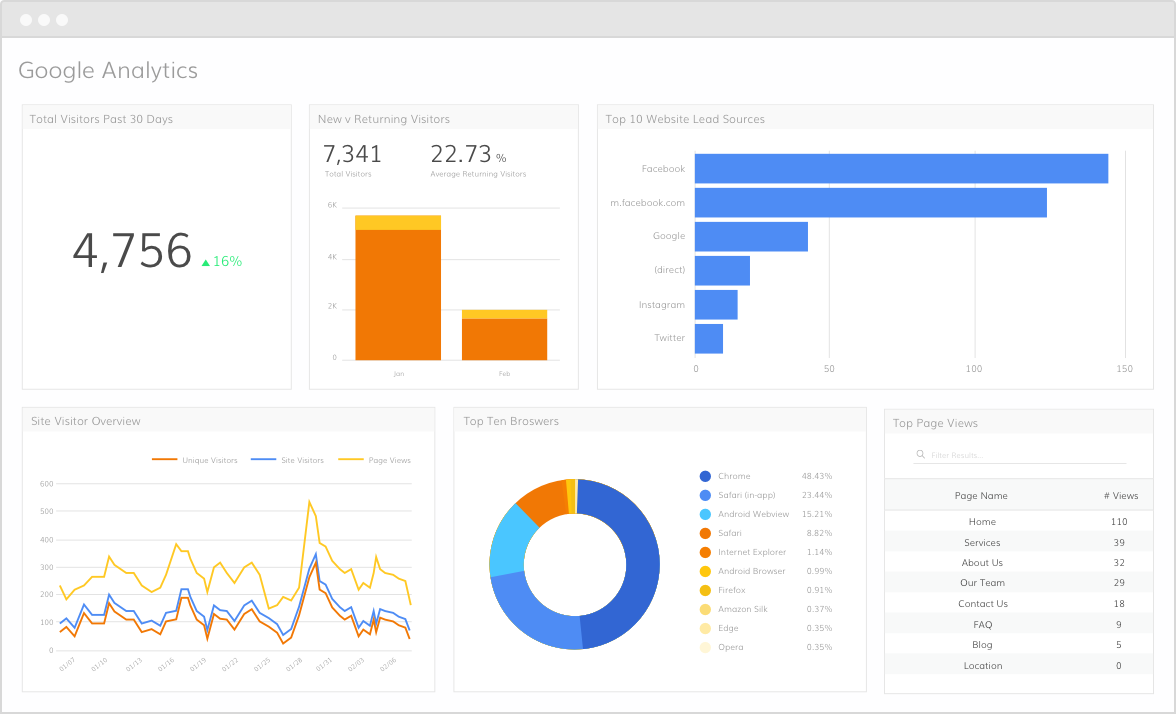 Google Analytics dashboard
When you monitor your website performance, you’ll want to see the most important information first. To do this, the dashboard can be set up to show you data that is most relevant to your needs. This interface can be changed depending on what you want to see first.
To set it up, log in to your account, select Dashboards > New Dashboard > then add Widgets.
This element is ideal for seeing an overview of information, and then you can drill down into more detailed metrics.
If you’re curious about what Google Analytics can tell you, you’ll find out that that it can give you a lot of relevant data to boost your business. One of the best Google Analytics techniques is determining where your visitors are located and how much time they spend on the site.
It’s easy to find this data, just drill down into Visitor > Location.
You’ll see a list of countries with plenty of information on visits and bounce rates. You can also see deeper into the data with state information and conversionA conversion is a desirable result on a website that leads to an action such as completing an order, filling out a form, or simply clicking on a link. rates in each country segment.
Other helpful information includes looking at what people are searching for on your site. Seeing what search terms and content they enter and look through can help you determine what is working and what’s not for your site. If your visitors come through onto a page and immediately click off, it’s an excellent opportunity to evaluate what is on that page to improve conversion and time spent on your site.
You can find out a host of information about your visitors, including:
To help you improve your site, it’s a great idea to get a feel for your top-performing pages and what they bring that others don’t. Looking at page views and analyzing what keeps people interested will help you improve other underperforming pages. It also builds a picture of what to keep doing to ensure future content is catering to the right audience and their interests.
While it’s good to see what your best-performing pages are, it is crucial to monitor the areas your website is not doing so well in. This is an important area of what is Google Analytics is useful for and will ensure you optimize these areas to improve overall rankings and searchability. Compare these pages to top pages and see what can be changed to get your traffic and conversions moving in the right direction.
It’s natural for some people to change their mind at the checkout. Still, if your website is seeing this frequently, it’s essential to understand why. Suppose your website has a multiple-step checkout process. In that case, Google Analytics can help you track the process by setting up a Goal Funnel.
You can do this by going to the Settings icon > Goals > Create a New Goal.
Here you enter the details of the URL Destination, which is the final URL of the checkout process, and then add the other URL steps in the process. This Goal will help you identify which page the customer leaves from the most and will identify any issues in the checkout UX.
Traditionally, many websites were designed purely for desktop use. However, the use of smartphones has catapulted the need to have a mobile-friendly website more than ever. Google Analytics can be used to identify whether you need a specific design for mobile users. By going to your account and checking the Visitor menu and selecting the Mobile option, you may be surprised to see how many of your audience use this method to search your site.
This breakdown will give you particular devices people use, visits, and bounce rateBounce rate is the percentage of visitors to a website who visit only one page. A high bounce rate indicates that visitors are not satisfied with your website.. You may find that some devices perform better than others. This data ensures you don’t miss out on valuable mobile visits and can help you decide whether to invest in a user-friendly mobile website in the future.
Google Analytics topics cover a multitude of aspects to improve the performance of your website. You can also find out more about how to work with Google Analytics with handy online resources.

AI search is a hot topic, and it’s also confusing. There’s a lot of tools…

First, there was ChatGPT, where you could ask a question and get an answer. Next,…


What is Content Marketing? Download Our How-To Guide Today!
The search engine landscape is constantly changing; search in 2022 is no exception. New trends and algorithm updates occur all the time in the search engine world.

Towards the end of September, on the 24th, Google released the second spam update in…

The amount you invest in your link building budget should be based on the realistic…

Search engines aren't the only automated systems accessing, interpreting, and making sense of content found…

There's plenty of scope when creating SEO campaigns. Each industry that turns to experts for…

PR has long supported brands in building authority and spreading awareness, but PR distribution has…

SEO can be complicated. It’s constantly changing and is not a one-and-done job. That’s something…

Google announced it was rolling out a further spam update on August 18, 2026. It…

Growing an SEO agency takes a lot of hard work. You've got to keep up…
Fill out the contact form or give us a call for a free consultation to determine the right digital marketing solutions for the growth of your business.

The team will usually respond within 1 hour.