Google’s AI Overview: Everything You Need to Know in 2025
AI search is a hot topic, and it’s also confusing. There’s a lot of tools…


If you want more consumers to find and visit your website, then you need Google to know who you are. While there are other search engines, Google remains the most popular search engine in the world, with up to one billion active users every single month. That means if you want to be found, then you need to get the maximum use from Google. If you have a current website that is not performing well on SERPs (or not appearing at all), or you are launching a fresh new site, then you need to make sure that your pages are on the Google index.
The good news is that there are no mysteries to solve when it comes to making sure that Google knows who you are. They want to know that your website exists so that they can continue to provide the best value for their users. If you’re unsure how to get google to crawl your site, it is surprisingly straightforward. Google uses bots (often called spiders) that crawl the internet looking for new pages so that it can index them. GooglebotGooglebot is a web crawler. It follows links and indexes pages for search engines to make it easier for users to find what they're looking for. (the name of the bot that Google uses) follows hyperlinks, finds new pages and sites, and then stores them in the Google index. Once your site has been indexed, then you are in the race for a presence on search engine results pages.
It’s very easy to check whether you are on the Google index. Simply head to the search engine and type in:
site: yourwebsitename.com

If you are in the Google index, then you should then see a list of all of the pages that Google has indexed within that URL. If none of your webpages show up, then you haven’t been indexed by Google. It’s a great idea at this point to use Google Search Console and test your website URL in the Coverage Report section. This will break down the facts into an easy to read a report that will show you the valid number of pages you have. If that number is anything other than zero, then you have issues to resolve. Remember that you can request Google crawl your site at any time using Google Search Console.
If your search has shown that there are issues with your online visibility, then you need to take the following steps to rectify that issue.
This is a common issue, but it’s an easy fix. There may be a possibility that you are unintentionally blocking Google from crawling your website and recording your site on the Google index!
User-agent: Googlebot
Disallow: /
Or
User-agent: *
Disallow: /
These lines of code mean that Google can’t see what’s on the pages, and that means they can’t rank you on SERPs. Either remove the code entirely or change the coding so that it says ‘Allow’ rather than ‘Disallow’.
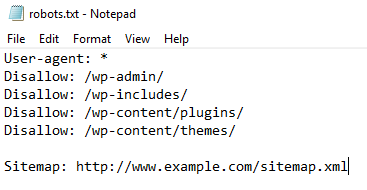
There are valid reasons why you might not want Google to crawl specific pages on your website. You can do this in a few different ways. The robots.txt is one way, but you can also put a no-index command into your metatags. Check using the Ahrefs Site Audit tool and head to the Indexability report. You will see warnings if any pages have a no-index metatag, which you can then remove if you want those pages to be incorporated within the Google index.
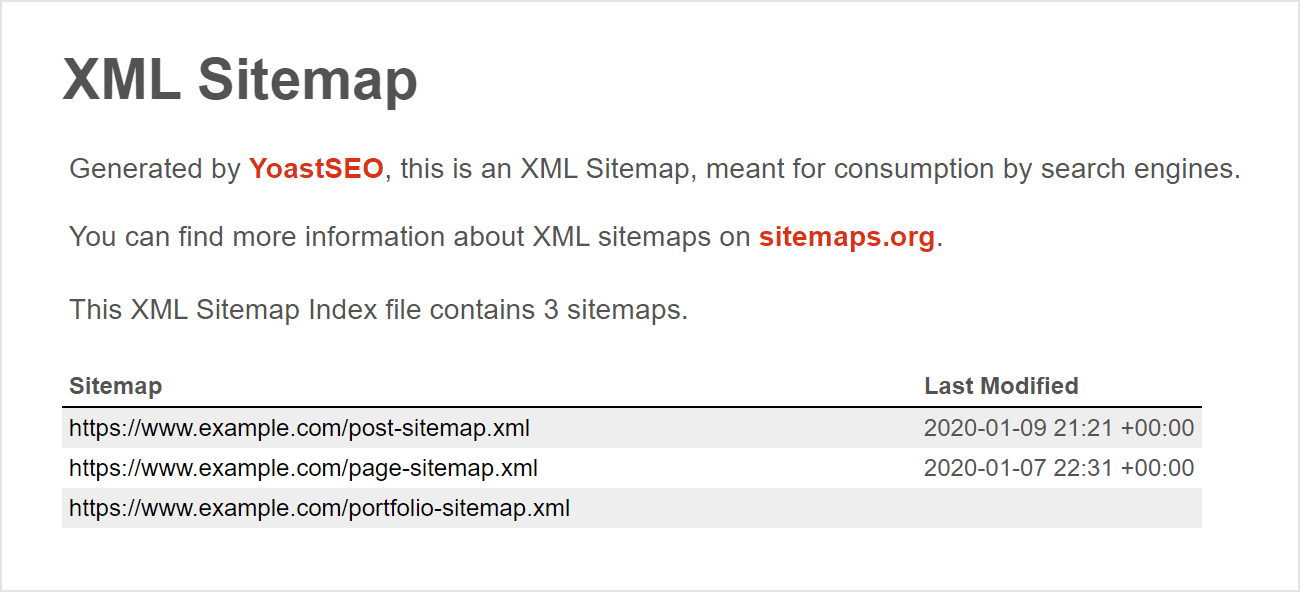
Although Google is perfectly able to find your pages without a sitemapA site map is a list of pages on your site and their relative importance. Use sitemaps to make it easier for visitors to find what they're looking for, and to ensure that search engines can find all the information they need., it will find it much easier if those pages are included. Your sitemap is, essentially, your way of showing Google exactly what pages you think are important (and which pages can be ignored). Again, using Google Search Console is the key to working out if this is the issue. There, you will find the URL Inspection Tool, and you simply type in your URL. If you see the response’ Sitemap: N/A’ or ‘URL is not on Google’ then you need to add those pages to your sitemap and submit site to Google for indexing using:
http://www.google.com/ping?sitemap=http://yourwebsite.com/sitemap_url.xml
This will make Google crawl your site much faster, indexing as it goes.
 Orphaned Pages
If there are no linksHyperlinks, also known as links, are the connection points on a webpage that take you to other webpages. to a new page, then Google simply won’t be able to find it. Make sure that you have internal links to any new pages and use Ahrefs Site Audit for a comprehensive list of any orphan pages. Once identified, you can either remove the page entirely (if it is not important) or include it within your internal linkInternal links are links that connect different pages on your website. They help users navigate your site and make it easier to find information, structure.
It’s not just orphaned pages that are a problem. These link-related issues will also need to be addressed:
A basic of SEO is providing value—the better your content, the more likely that you will be ranked on Google. If your pages aren’t showing up and there are no technical issues, but you’re still not appearing on SERPs then you are simply not providing quality or value or are not unique enough to stand out. Get rid of any low-quality or repeated pages (or use a robot.txt file to hide duplicate pages from Google’s bots).
Now that you know how to get Google to crawl your site and index it, you can start to move forward. Once your website and the relevant pages are in the Google index, then you can begin to work on improving your SERP rankings, using SEO to ensure that you are always on the front page of a related Google search, and more easily found by your future customers.

AI search is a hot topic, and it’s also confusing. There’s a lot of tools…
First, there was ChatGPT, where you could ask a question and get an answer. Next,…

Seasonality can have a huge effect on the success of your business. It is imperative to have a strong digital marketing campaign during periods of high consumer demand.

The search engine landscape is constantly changing; search in 2022 is no exception. New trends and algorithm updates occur all the time in the search engine world.

Domain Rating (DR) is one of the most talked about SEO metrics. It’s used to…

A well-written press release is one of the most impactful ways to secure quality media…

If you look back at films from the 80s, filmmakers created visions of flying cars…
The phrase “content is king” was so commonplace for years that many businesses and web…
Towards the end of September, on the 24th, Google released the second spam update in…
The amount you invest in your link building budget should be based on the realistic…
Search engines aren't the only automated systems accessing, interpreting, and making sense of content found…

There's plenty of scope when creating SEO campaigns. Each industry that turns to experts for…
Fill out the contact form or give us a call for a free consultation to determine the right digital marketing solutions for the growth of your business.

The team will usually respond within 1 hour.
